 A few days ago, I argued that it was worth publishing your ebook through Smashwords, even if you’re using PubIt (Barnes & Noble) and Kindle Direct Publishing (Amazon) to handle distribution to those stores on your own. One of the benefits of listing ebooks on Smashwords is that you can generate coupons for your titles.
Sure, you can change your ebook’s price in the Kindle or B&N store any time, but with a coupon the buyer is aware they’re being offered a deal. This can be a helpful promotional tool.
As you probably know from your own grocery shopping experiences, a coupon can entice you to try something you might not buy at full price. Too, coupons with expiration dates or “limited time offers” encourage us check things out sooner rather than later (or never).
How I’ve Used Coupons for My Ebooks
I noticed the Smashwords coupon generator right away and started using coupons to give away review copies of my ebooks. While not everyone has a Smashwords account, many of the bloggers who run review sites that accept indie ebooks do.
I’ve also used 100%-off coupons to offer people free books as prizes in contests or giveaways (if you do blog book tours, you’ll have lots of opportunities to do this on other people’s sites). Unlike with an email, where you send the epub or mobi file, you can track whether or not the coupon is actually redeemed.
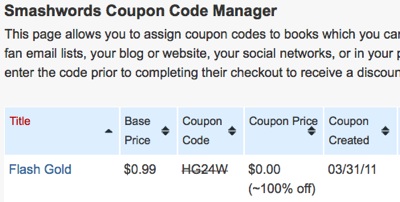
When I released Flash Gold earlier this month, I didn’t do a lot of promotion since it was just a side project (and, okay, I’m lazy at times). I did decide to create a 100%-off coupon that first weekend in hopes that a couple of folks might read it and leave reviews at Amazon, Barnes & Noble, or Smashwords (there are reviews in all of those places so thank you readers!). I headed over to the MobileRead forum and posted the blurb, cover art, and coupon code in the “Author Self-Promotion.” I also made it clear the coupon was only good through Sunday.
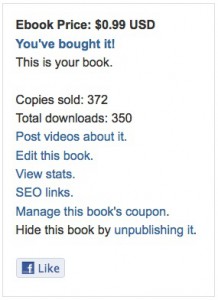
Several folks there downloaded the ebook, and then, Sunday morning, I received an unexpected bonus. A hundred-odd downloads had showed up on my Smashwords dashboard since the night before. After scratching my head and hunting around the internet, I discovered the reason. Thanks to the MobileRead post, Flash Gold had been mentioned on a popular blog that lists ebook bargains. By the end of the day, the coupon had been “cashed in” more than 300 times.
Sales of my other ebooks have been good thus far in April, and I believe some of those buyers might be people who first found my work because of that blog post and that coupon.
Generating a Coupon for Your Ebook
At Smashwords, you can type in any “percentage off” for your coupon. I’m a fan of free, but you can do anything you want. If you’re selling your ebook for $5, then a “half off” coupon might be perceived as a good deal.
To generate a coupon, head over to your book’s page on Smashwords, and click “Manage this book’s coupon” on the right-hand menu. On the next page, you’ll choose a percentage and an expiration date, and that’s all there is to it. Once you’ve created the coupon, you can also access the information from your dashboard (under “operations”).
Promoting Your Coupon
A coupon is no good if people don’t know it exists, so now it’s time to get the word out. The minimum you need to give people is the link to the book’s Smashwords page and the coupon code itself, but you may get more takers if you also include the cover art and blurb with your announcement. Even when an ebook is free, time is still money, so you have to convince people your ebook is worth checking out.
As far as places to promote go, I already mentioned the MobileRead forum, but you can doubtlessly think of lots of other venues. Try forums full of ebook-reading people (Kindleboards, Nookboards, etc.), Facebook, Twitter, your blog, etc. One of the perks with Smashwords is that they list your ebook in all formats, so anyone will be able to use the coupon, no matter which e-reader they prefer.
If you have questions or suggestions for people (maybe you’re already a coupon-using pro!), feel free to comment below. Thanks!

Excellent post. I’ve never heard of MobileRead before. One thing I can say for sure, I’m horrible at getting the word out. Thanks for the pointers.
Great post Lindsay! I think the coupon feature is a great one! I don’t know why all e-retailers don’t do it. When you get a coupon, YOU feel special, like YOU’RE the only one cashing in on this deal. Glad you brought this up — I’m not sure I would have thought of it as a marketing tool!
Thanks for the comments, Syd and Reena! Coupon codes *do* make me feel special, especially if I scored them due to ten minutes of diligent Google searching. *g*
My novel has been languishing on Smashwords for over a year, with only a handful of sales and a couple of excellent reviews to show for my endeavours.
I decided to generate a coupon offering the book for free and advertised it on Mobile Reads. That was less than an hour ago and I’ve already had six free copies downloaded. Amazing! No money earned, but potentially very valuable publicity.
Hi Lindsay,
Thanks for the tip. I hadn’t heard of MobileReads before but I’ve joined up and offered a free coupon.
Camilla
Thanks for this post – it was really helpful. I do have a question though – does giving away free coupons/books to people cost the author money?? Do you have to pay for Smashword’s percentage of the book or is it entirely free for the author? Before I start generating all those free coupons, I want to know if I’ll have to pay for them later on. Thanks!
No hidden fees, Deanna. Smashwords is very author friendly.
Thanks for such as great post. I had some questions about using the coupons and you answered them! I just came out with a new YA Fantasy/Sci-fi novel and I’m getting ready to try a giveaway sort of deal.
I have just had my first book published on Smashwords and already in the process of sending out coupons today, so lets see….the book is a true story and called Wrong Place Wrong Time….
Great post by the way..
Thanks for this post! I’m working on our organization’s first ebook, and we’d like to offer it for free using a set-up like this. However, because we’re a non-profit, we want to use the free book as an incentive for people to join our mailing/contact list. As the author, are you able to see which customers used the coupon code? That would be ideal. Apart from that, we’re considering setting up an email form where people who complete that are sent the coupon code to use. Have you done anything like this to grow a contact list?
You can only see how many times the coupon was redeemed, not who did the redeeming.
In the internet-marketing sphere (usually dealing with non-fiction), I see a lot of free ebooks offered in exchange for a mailing-list sign-up, yes.
You can try that or try making the book permanently free at Smashwords and then, in the afterword, asking folks to sign up for your list if they want tips/news/coupons/etc.
It’s a toss-up on which would be more effective. The first way, you’d know people had signed up, because they couldn’t get the book otherwise. With the second way, you’d get a lot more people checking out the book overall, but they’d only sign up if it resonated with them.
Good luck!
This is interesting. I have been asked to provide my book on a certain site to those readers exclusively. I wasn’t quite sure how to do it but this gives me a clue. I have several books on Smashwords and Kindle; Fireclosure, Joe Detective series, and three others about to go up. Promotion is the tough part. But I’m working on special promotions so the coupon approach with a sign-up is especially interesting especially for future books. Thanks a million.
JH Gordon
Fireclosure
http://www.smashwords.com/books/view/98807
Hi I’ve just published my Juvenile fiction book Brenna and the Horses of Lusayana on Smashwords but also have it on Amazon.
I want to send out review copies and maybe giveaway ten copies. How do you manage review copies – do you send a coupon or just send the file. If you send a coupon and it has to be redeemed in say six weeks how do you know lots of people won’t use it. Same with giveaways. The reason I mention Amazon is they can drop the price if they find out it’s free somewhere else. Sorry for long post but this is the first conversation I’ve found about this.
I want to create a system in which each buyer’s confirmation email includes a coupon code unique to them, for them to share with their friends. This way I can track who I owe for referring me, and reward the referrers. Anyone know how this can be done?
I never heard of Mobilereads before either. Thanks for this!
It’s time intensive to generate a coupon individually for one reader at a time. I gifted by Coupon a UK reader for each of the 4 Books in my Peace Series recently, as I updated each one after she began an Email revolution when I removed them and decided not to publish Book 5 in the Series.
Note, if your readers download to a reader/service, as you update they may not be able to reload new versions without paying all over again.
Emma found this to be the case on Kobo. I generated 4 coupons, one for each book. I also placed a redemption time limit on them. That way even if they circulate, they STOP working at a certain time. 4 to 5 days is enough time, less if they are expecting the Coupon.
Always use coupons, because if you discount a book on Smashwords, other sellers may not ever update your change back to regular price! Set a time limit, and advertise it everywhere you can, especially on Social media! Be encouraged!
Great blog. I also had never hear of MobileRead. I intend to take advantage of your advice.
Great tip!
Can multiple readers use the same coupon? If I wanted to give my book to 200 people to get their reviews, could they all use the same coupon? Do the coupons have an expiration date?
Many thanks
Yes, Bruce, once you share the coupon code, anyone who has it can grab the book. You can set the expiration date when you set it up on Smashwords.
Great breakdown! Is the coupon effective immediately?
It is, and I believe you can have them be good for up to a year.